Run Linux Desktops in Docker.
Simple. Fast. In your browser.
A lightweight web dashboard to launch, manage, and use Linux desktop containers and developer services directly from your browser.
docker run -d \
  -p 127.0.0.1:8080:8080 \
  -v /var/run/docker.sock:/var/run/docker.sock \
  ghcr.io/mngdlnx/prototype:latest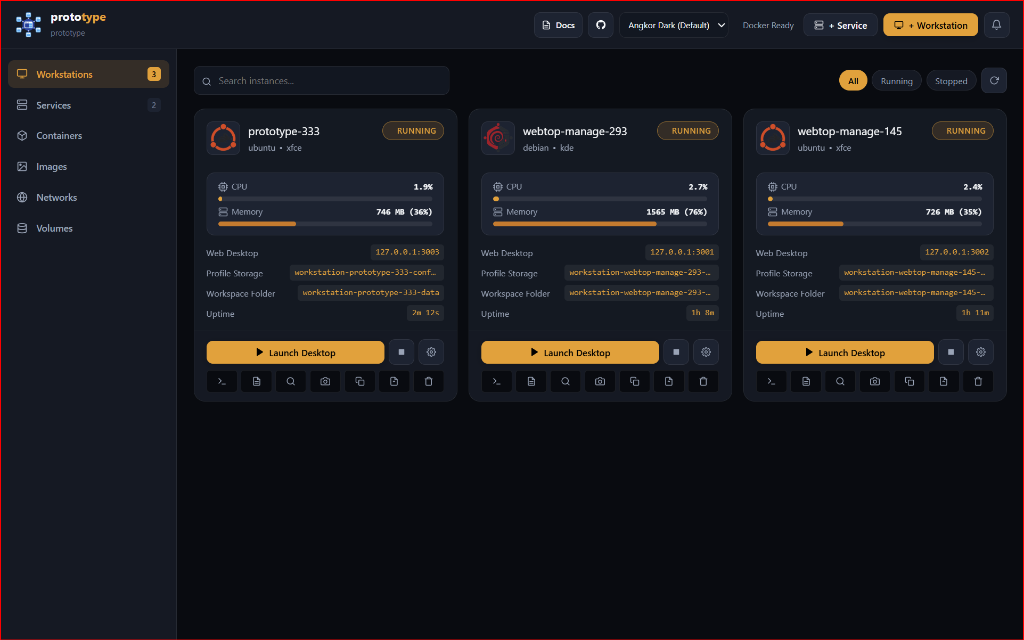
Engineered for Performance & Total Isolation
Everything you need to orchestrate containerized Linux desktop environments with zero overhead and rock-solid defense-in-depth defaults.
Dual-Track Provisioning Wizard
Quick Launch curated workstation & database presets or Custom Blueprint with GPU acceleration, dynamic port allocation, and dynamic mount lists.
Deep Kernel & Container Inspector
Inspect low-level Linux namespaces, cgroups v2 quotas, Linux capabilities, live Docker Compose v3.8 spec generator, and raw searchable JSON.
Defense-in-Depth Host Isolation
Strict 127.0.0.1 loopback isolation, Host Isolation Middleware blocking control plane access, and null-routed host.docker.internal gateway.
OCI Runtime Strategy Engine
Extensible strategy pattern supporting standard runc, gVisor (runsc) user-space virtual kernels, Kata Containers MicroVMs, and crun.
Docker Resource Management
Visual lifecycle management for Docker Images (pull/prune), Volumes (named/bind/deep prune), and user-defined Bridge Networks.
100% Stateless Zero-DB Engine
Docker container labels serve as the atomic single source of truth. No SQLite or PostgreSQL needed. Zero migrations, zero corruption risk.
Tailored for Every Workflow & Distro
Compare pre-tuned configurations with calibrated Shared Memory (/dev/shm) and hardware acceleration.

Ubuntu Workstation (XFCE)
Popular • Fast • Lowest Memory (~250MB Idle)
General software development, Python/Node.js scripting, lightweight browsing, minimal host overhead
{
  "name": "sonic-ubuntu-850",
  "preset": "ubuntu-xfce",
  "image": "lscr.io/linuxserver/webtop:ubuntu-xfce",
  "host_ip": "127.0.0.1",
  "host_port": 3000,
  "internal_port": 3000,
  "custom_user": "abc",
  "shm_size_mb": 1024,
  "auto_start": true
}workstation-<name>-config & workstation-<name>-data API docs ↗ Security & Network Isolation Architecture
Designed from the ground up for strict local-first security. Click nodes in the diagram to inspect security guarantees.
Strict Loopback Host Interface
127.0.0.1:8080 & 127.0.0.1:3000-3050prototype Go Daemon
Lightweight Binary · Docker Socket ControlDedicated subnet per instance or airgapped isolated sandbox.
Separate /config from /workspace.
Strict 127.0.0.1 Loopback Isolation
Every workstation published port (e.g. 3000, 3001) and the management daemon port (8080) explicitly bind to 127.0.0.1 rather than 0.0.0.0.
- Cannot be scanned by unauthorized devices on local WiFi or LAN.
- Protects against accidental open firewall ports on VPS deployments.
- Pair with Caddy, Nginx, or Cloudflare Tunnel for authenticated remote access.
Launch in Seconds with Docker Compose
Deploy the management engine with zero database dependencies. The single lightweight Go binary handles container provisioning, SSE telemetry, and WebSockets.
Strict 127.0.0.1 Binding: Guarantees zero unintended LAN or public exposure.
Isolated Bridge Network: Creates dedicated sandbox bridges (`workstation-<name>-net`) with Kernel Air-Gap support.
Visual Host Directory Browser: Read-only `/:/host:ro` mount enables secure interactive folder selection.
services:
  prototype:
    # Use official pre-built multi-arch image (or build: . from source)
    image: ghcr.io/mngdlnx/prototype:latest
    container_name: prototype
    restart: unless-stopped
    ports:
      # Strict 127.0.0.1 loopback binding for security
      - "127.0.0.1:8080:8080"
    volumes:
      # Docker daemon socket passthrough to manage sibling containers
      - /var/run/docker.sock:/var/run/docker.sock
      # Host root filesystem mount (read-only) for visual folder browsing
      - /:/host:ro
      # Optional: Custom Presets, Themes & Config files
      # - ./presets.json:/app/presets.json:ro
      # - ./themes.json:/app/themes.json:ro
      # - ./config.json:/app/config.json:ro
    environment:
      - PORT=8080
      - BIND_HOST=0.0.0.0
      - APP_TITLE=prototype
      - DEFAULT_INSTANCE_BIND_IP=127.0.0.1
      - DEFAULT_NETWORK=prototype-net
      - DEFAULT_TZ=Etc/UTC
      - DEFAULT_KEYBOARD=en-us-qwerty
      - DEFAULT_SHM_SIZE_MB=1024
      - BASE_PORT=3000
      - DEFAULT_EGRESS_POLICY=full
    networks:
      - prototype-net

networks:
  prototype-net:
    name: prototype-net
    driver: bridge
Ready to supercharge your Linux workstation workflows?
Explore complete developer guides, protocol specifications, SSE telemetry, and REST API documentation.